





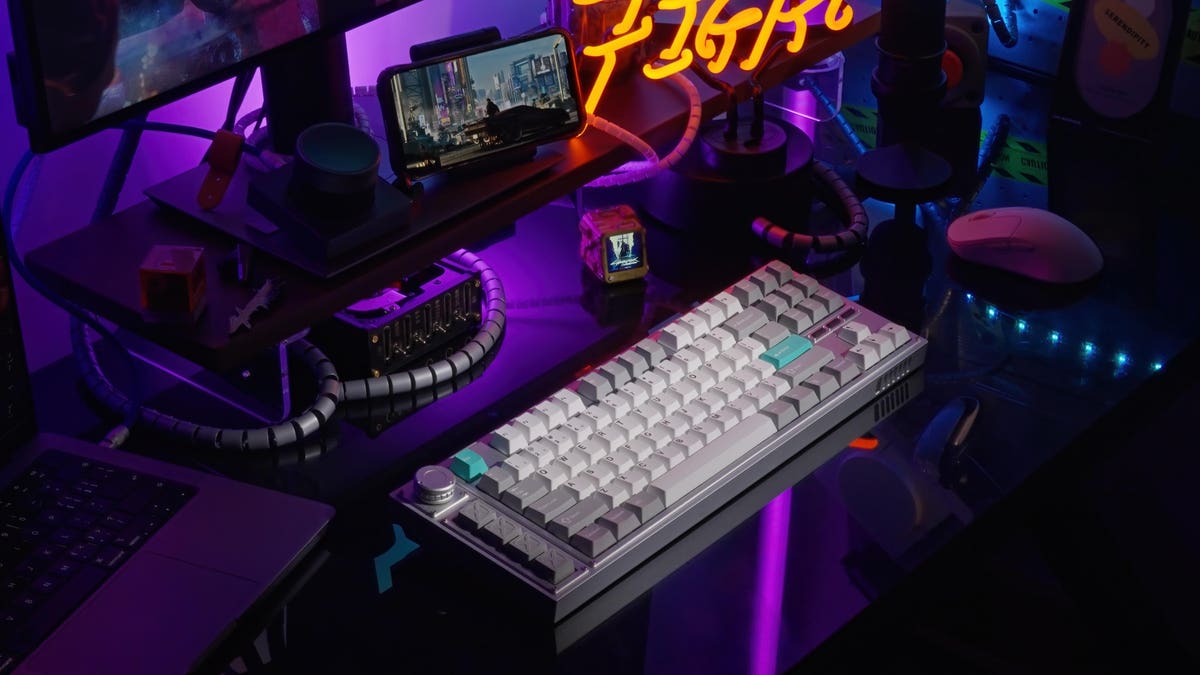
Gamers love mechanical keyboards and it’s a market sector that’s super-hot right now. The latest keyboard aimed at dedicated gamers is the new Lemokey L3 from Keychron. But if you aren’t a gamer, don’t let that put you off because the new L3 is one of the best-made and most versatile keyboards available.
The Lemokey L3 is an incredibly robust keyboard built to withstand severe gaming abuse. The keyboard frame is made from 6063 aluminum milled on a CNC machine. It is so substantial that it stays on a desk, no matter how hard the keys are pressed. The L3 is an absolute joy to type on, thanks to the enhanced rigidity and structural stability.
Because the Lemokey L3 can be completely disassembled, it’s an easy keyboard to modify and upgrade with new switches or stabilizers. All the switches are hot-swappable, so you can choose the MX-compatible switches you want to use to give the tactile click and feel that suits your typing or gaming style best.
A double gasket that absorbs vibrations and noise from the key switches is inserted between the top frame and the keyboard case. The gasket delivers a flexible typing feel, making long gaming sessions more comfortable and less tiring.
Like many mechanical keyboards, the Lemokey L3 can connect with up to three Bluetooth devices and a host computer using a USB-C cable. The wired connection offers a polling rate of 1,000Hz, meaning very low latency levels that gamers need and demand.
In addition, the L3 also ships with a 2.4GHz USB dongle, which offers an ultra-low-latency wireless connection. The L3 supports NKRO so that no matter how fast you type, the L3 always remembers your key presses and the order in which they were activated.
The keycaps on the L3 are premium double-shot construction and made from ultra-durable PBT material. The layout is an 80% design with 91 keys. There’s an option of Carbon Black, Navy Blue and Silver finishes, plus a choice of Gateron Jupiter Red, Brown or Banana switches. All the Gateron switches are pre-lubed and very smooth to type on.
In addition to the regular 80% layout, the Lemokey L3 has a column of four macro keys and a rotary encoder. The L3 is set up for the rotary encoder to function as a volume knob and mute button out of the box. That can be changed because the keyboard is fully programmable with QMK/VIA. All you need to do is connect the L3 to a computer using the supplied USB-C cable, then go to the VIA website using the Chrome browser.
You can remap any of the keyboard’s keys that you like using VIA. You can assign macros to the column of four macro keys and remap the command keys to work with macOS. Out of the box, the L3 is set up for Windows. Unlike most Keychron keyboards, the L3 has no toggle switch to shift between Windows and macOS.
It only took me a couple of minutes to remap the Command and Alt keys on the L3, so my Mac Mini responded as expected. I also remapped the macOS Sleep command to one of the macro keys so I could put my computer to sleep with one key press. Programming a keyboard using VIA can be addictive, although I wish there were more support for all macOS commands.
As you might expect with a gaming keyboard, all the key switches have RGB LEDs and can be set in various colors and lighting effects. The LEDs can be changed using the Function key and keypresses, but the lighting is also programmable using VIA. You can even program specific lighting effects and colors to one of the macro keys.
Verdict: Mass production of the Lemokey L3 starts this September, with Q&A testing throughout October. I have had a chance to test one of the first L3 keyboards and I think it’s a triumph. The L3 is one of the best and most robust gaming keyboards available. Although I am not a serious gamer, I was blown away by the superb typing action of the L3 that I borrowed for this review. The switches on the test keyboard were Gateron Jupiter Banana and just the right balance between smooth action and an excellent clicking sound. Built-in PCB-mounted screw-in stabilizers make for very smooth typing, even with the larger keys like the space bar and return. If you’re looking for a high-performance mechanical gaming keyboard that’s completely programmable and built to last, the Lemokey L3 is a winner. Highly Recommended.
Pricing & Availability: The Lemokey L3 by Keychron can be customized with your choice of switch type. You can order the L3 fully assembled for $214 or as a bare-bones kit to build at home for $194. Both ANSI and ISO versions are available.
More info: www.keychron.com
Tech Specs:
- Number of keys: 91 ANSI (US) or ISO.
- Back height: 29.84mm.
- Front height: 19.8mm.
- Frame: CNC machined aluminum.
- Plate material: PC.
- Keycaps: Cherry double-shot PBT.
- Switches: Gateron Jupiter.
- Stabilizers: Screw-in PCB.
- Switch face: South-facing RGB.
- Backlight: 22 types of RGB backlight options.
- Hot-swappable: 3-pin & 5-pin MX mechanical switches.
- MCU: ARM Cortex-M4 32-bit STM32F402 (256KB Flash).
- Cable length: 1.8m.
- Polling rate: 1000Hz (2.4GHz and wired) / 90Hz (Bluetooth mode).
- N-Key Rollover (NKRO): Wireless and wired modes.
- Battery: 4,000 mAh li-polymer.
- Working time (backlight off): Up to 200 hours.
- Working time (RGB): Up to 100 hours (lowest brightness).
- Charging time: Approx 5 hours.
- Charging port: USB type-C.
- Bluetooth version: 5.1.
- Compatible Systems: Windows/macOS/Linux.
- Connectivity: 2.4 GHz / Bluetooth / Type-C wired.
- Dimension: 401 x 137mm.
- Weight: 1,976 g (fully assembled).
Read the full article here