





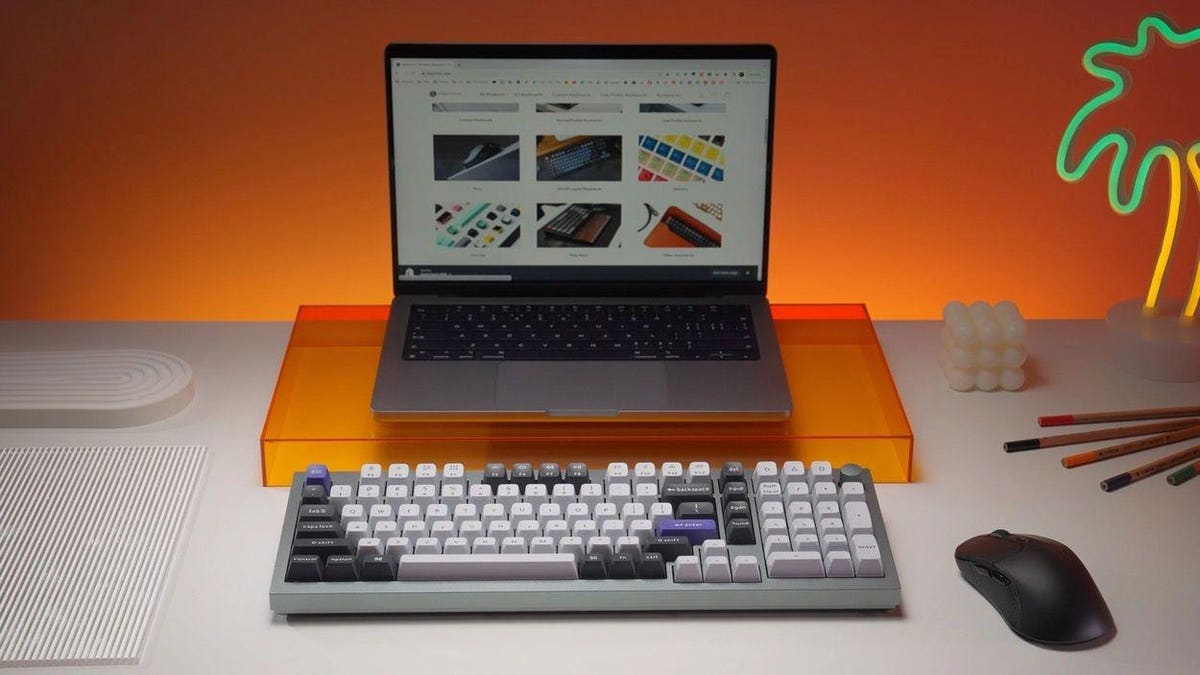
The popularity of mechanical keyboards shows no signs of abating, according to Keychron, one of the biggest makers of premium mechanical keyboards favored by gamers or hard-core typists who want an ultra-responsive keyboard that can withstand the daily punishment of high-end gaming, advanced spreadsheet filling or simply authoring novels.
The latest mechanical keyboard to be launched by Keychron is the new Q5 Pro. This 96% keyboard has a compact layout with a numeric keypad, a full row of media and function keys, a programmable rotary knob, and a cursor cluster. The Q5 Pro has a relatively compact footprint that won’t take up as much desk space as a traditional 100% keyboard layout.
The Keychron Q5 Pro is completely customizable and features hot-swappable switches so the user can have a variety of tactile feedbacks and sounds, ranging from silent to ultra-clicky. The Q5 Pro also has a full CNC-milled aluminum body and feels like a beast of a keyboard with a weight of over 2kg.
Like most keyboards made by Keychron, the Q5 Pro can be connected to a host computer using Bluetooth or a USB-C cable. The built-in battery powers the Bluetooth function and can connect with up to three host devices. Users can switch between the three Bluetooth devices with a key press. This is a handy function if you’re working on a Mac, PC or tablet and need to control them all using just one keyboard.
In wired mode, the Q5 Pro has a polling rate of 1,000Hz, ensuring gamers never miss a beat. In wireless mode, the polling rate drops to 90Hz, which is still pretty good. There is support for N-Key rollover (NKRO), a feature on many mechanical keyboards that let the user press many keys simultaneously. Each key press is individually registered with NKRO, which is especially useful for gamers who often press multiple keys simultaneously.
Not so long ago, most mechanical keyboards were made exclusively for Windows computers. However, over the past year or two, demand for mechanical keyboards from Mac users has taken off. The Q5 Pro ships with sets of keycaps for both Mac and Windows operating systems, plus a hardware switch on the rear of the keyboard shifts the layout between macOS and Windows.
German company KSA makes the double-shot keycaps that ship with the Q5 Pro. The keys are made from hardwearing PBT (Polybutylene Terephthalate) and all have south-facing RGB LEDs with 22 backlight settings. The hue, saturation, brightness, effect speed and mode of the RGB lights can be fully customized. Gamers seem to love this, but for those who are just typing words, it’s possible to turn off the RGB effect and enjoy a much longer battery life.
All the keyboards made by Keychron use open QMK/VIA firmware, enabling users to remap any key, create macro commands, set up shortcuts, or apply key combinations to a single key using VIA software. The programmability lets users assign complex commands or strings to a single key and it’s a handy feature if you take the time to learn how to program using the VIA software. It’s not too difficult, but it would be good if the interface were as easy to use as Kensington Konnect software which works with the Kensington MF7500 keyboard I reviewed earlier this month.
When ordering the Q5 Pro, users can opt for the type of switch they want fitted to the keyboard. Currently, Keychron offers a choice of Red, Brown or Banana switches. The Red switches are quiet and linear, so they don’t have a discernable click. Brown switches offer a gentle sound and have a tactile click. Finally, Banana switches have a gentle sound and a click which is softer than Brown switches. The Q5 Pro’s switches can be swapped out with 3- or 5-pin MX switches to give the keyboard a new feel.
To make the Q5 Pro 5’s typing experience a little smoother, Keychron has used screw-in stabilizers that connect with the keyboard’s printed circuit board. The stabilizers provide a smoother typing experience with a reduced wobble, especially on the larger keys such as the space bar, shift, enter, and delete keys.
The Q5 Pro is available in Carbon Black, Silver Grey and Shell White finishes. The keyboard can also be ordered as a barebones version so you can finish building and customizing the Q5 Pro to suit your preferences. Most people will probably want to buy the fully assembled version and there is the option to specify switches on the Keychron website.
Verdict: The Keychron Q5 Pro mechanical keyboard is about as compact as you can get with a numeric keypad. It has a handy programmable rotary knob which can be used to adjust volume, monitor brightness or other convenient functions. The build quality of the Q5 Pro is awesome and this keyboard can withstand plenty of punishment. If a switch fails, it can be easily replaced with almost any MX switch. If you want a sturdy and programmable mechanical keyboard with a numeric keypad, the Keychron Q5 Pro is an excellent choice.
Pricing & Availability: The Keychron Q5 Pro Knob Version mechanical keyboard is shipping now and costs $210 for the fully assembled version.
More info: www.keychron.com
Tech Specs:
- Dimensions (W x L): 145 x 408mm.
- Height: Front 22.6mm / Back: 35.8 mm (both without keycaps).
- Feet Height: 2.4mm.
- Keyboard angle: 5.2°.
- Weight: 2,160g.
- Body: Full CNC machined aluminum.
- Keycaps: KSA double-shot PBT keycaps, not shine-through.
- Switches: Keychron K Pro (Red, Brown, Banana).
- Stabilizers: Screw-in PCB.
- Backlight: South-facing RGB LED.
- Hot-swappable: Yes (3-pin & 5-pin MX mechanical switches).
- Processor: Ultra-low-power ARM Cortex-M4 32-bit STM32L432 (128KB Flash).
- Polling rate: 1,000Hz (wired) / 90Hz (wireless).
- N-Key rollover (NKRO): Yes (wireless and wired).
- Battery : 4,000mAh rechargeable li-polymer.
- Battery life (backlight off): Up to 300 hours.
- Battery life (RGB): Up to 100 hours.
- Bluetooth: Version 5.1.
- Compatible systems: macOS / Windows / Linux.
- Connectivity: Bluetooth / Type-C wired.
Read the full article here