




I do virtually all my reading on an eReader – I have for well over a decade. There are just so many advantages, with one of the primary ones being that I have my entire library ready to go on demand on a single device. One with a screen that works equally well in glaring sun, in darkness and everything in between. Up until now, the biggest issue I’ve had to deal with is justifying my continued use of a half dozen bookcases for a physical collection of books that I haven’t cracked open since making the leap to digital.
However, last night I ran into a serious glitch for the first time and based on reports and complaints in user forums, it turns out that it’s one of those things that does happen. It was extremely frustrating and took a bit of work to resolve, so I’m sharing the steps to deal with it here in case you have the misfortune of running into it at some point.
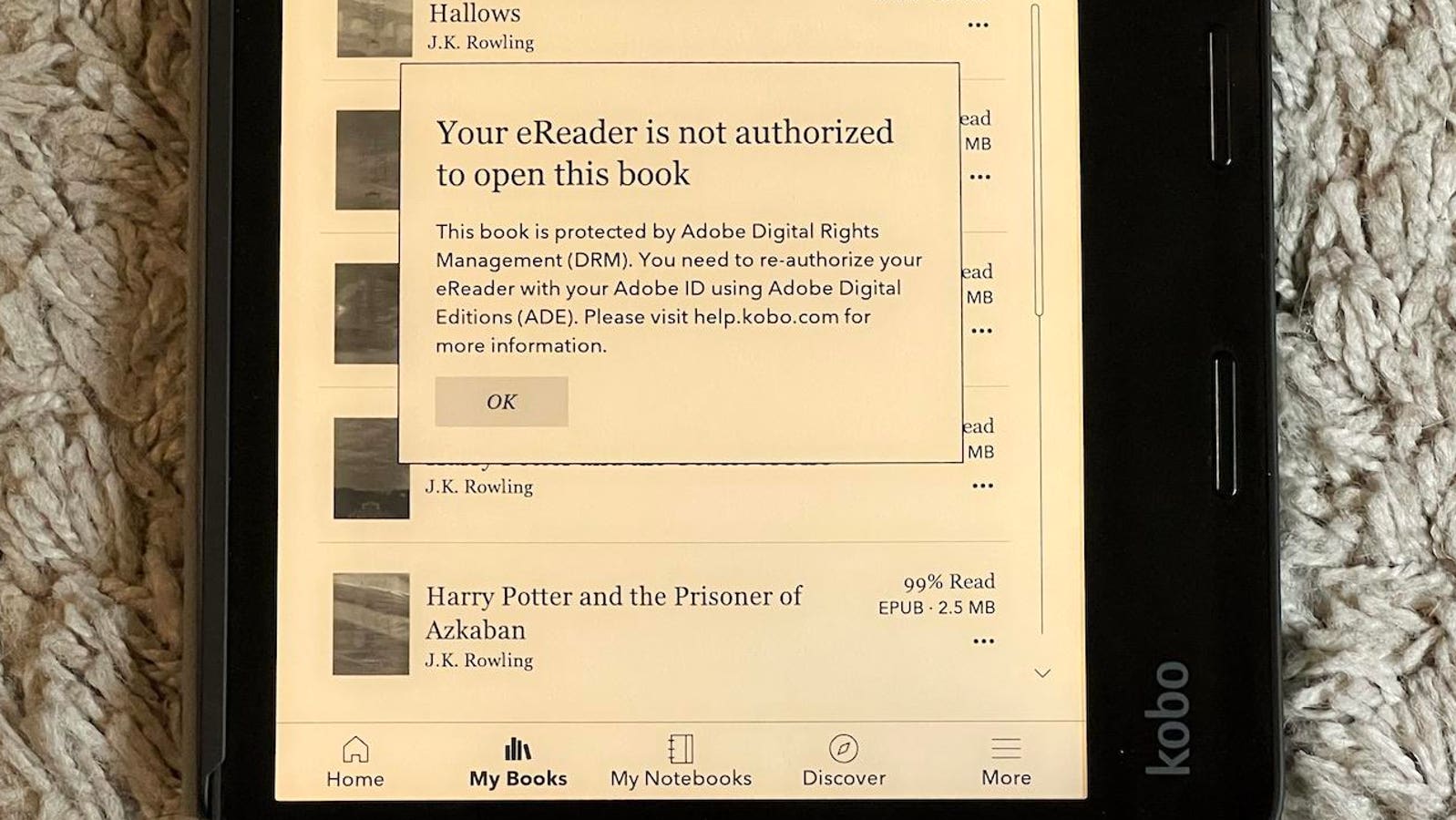
Here’s what happened. Last night I was reading before bed – as I do every night – went to open the eBook I’ve been reading for the past few days only to have an error plastered across the pages saying my eReader is not authorized to open the book, which is protected by Adobe Digital Rights Management DRM.
That’s right, everyone’s favorite: DRM.
Which was a head scratcher, because the eReader (a Kobo Sage) was authorized. I had done nothing unusual, just picked up the eReader from my nightstand and started back on the eBook I had been previously reading. At this point I went through my eBooks and sure enough, any that were protected by Adobe DRM, I was locked out of. Those that Kobo had sold without DRM still worked fine. I rebooted the device (you’d be surprised by how many glitches with any device can be resolved by rebooting it), but no such luck. I checked the eReader settings and sure enough, my Adobe account showed as being not authorized. Resolving the situation and regaining access to my purchased, Adobe DRM-protected eBooks required a computer and a few steps, which I will walk through.
Disclaimer: This how-to assumes that you have purchased the eBooks in question and already have an Adobe Digital Editions account – which was required in order for you to open the DRM-protected eBooks on your device in the first place. Also, I used a Mac but the process is essentially the same for a Windows PC.
How To Reauthorize A Kobo eReader With Adobe Digital Editions:
1. Download and install Adobe Digital Editions software on your computer, if it’s not already there and then sign in using your account.
2. Physically connect the Kobo eReader to your computer using a USB cable and allow the computer to mount it as a volume.
3. From the Devices list, choose the Kobo eReader and click the Authorize Device button. You should then see a dialog box informing you the eReader has been authorized.
4. Disconnect the Kobo eReader. On the eReader’s Settings, check under Accounts to confirm that it is now authorized with Adobe Digital Editions. If not (mine still wasn’t at this stage), reboot the eReader and allow it to sync over Wi-Fi and it should now be authorized. At this point you should be able to go back to reading your eBooks.
I still don’t know what happened to cause my eReader to be spontaneously de-authorized, but it’s now fixed. Of course I wouldn’t have run into this issue with the books stacked on the bookshelves throughout the house, but one glitch in over a decade of eReading isn’t enough to make me abandon the technology. However, it was a reminder of how quickly (and thoroughly) things can go wrong should there be a problem.
Read the full article here