





“Daaaaaad-uh!” You know it’s an important request when an extra syllable gets added to the end of the word. “I just want to play one song.”
If you have kids, you’ll be well familiar with this type of request. You’ve got whatever playlist on Apple Music that’s keeping you from going Mad Max on the traffic around you when your passengers decide they’ve had enough. No one can listen to this much Gordon Lightfoot.
Before iOS 17, allowing someone else to take control of your CarPlay playlist meant that you’d have to disconnect completely. Which, when attempted mid-drive goes about as well as you’d expect it would, leading to frustrated kids, grumpy parents, and, yes, more Gordon Lightfoot, playing on with blissful abandon.
Now, Apple has brought SharePlay to CarPlay. More than just giving grammarians like me the fits when typing the two features together, it finally gives your passengers some agency in what they get to listen to…as long as you let them.
What’s SharePlay?
Apple introduced SharePlay during pandemic-times in iOS 15. Originally a way to watch videos together over FaceTime, it’s been expanded in subsequent versions of iOS to let you listen to music, play games, and even workout together.
One thing missing from the mix of sharing were CarPlay options. It seemed like a no-brainer. Since the first human yelled “Shotgun!” passengers have been messing with the radio, digging through tape and CD collections, and plugging their phones into the AUX port. So we needed a seamless way to do that digitally.
How does it work?
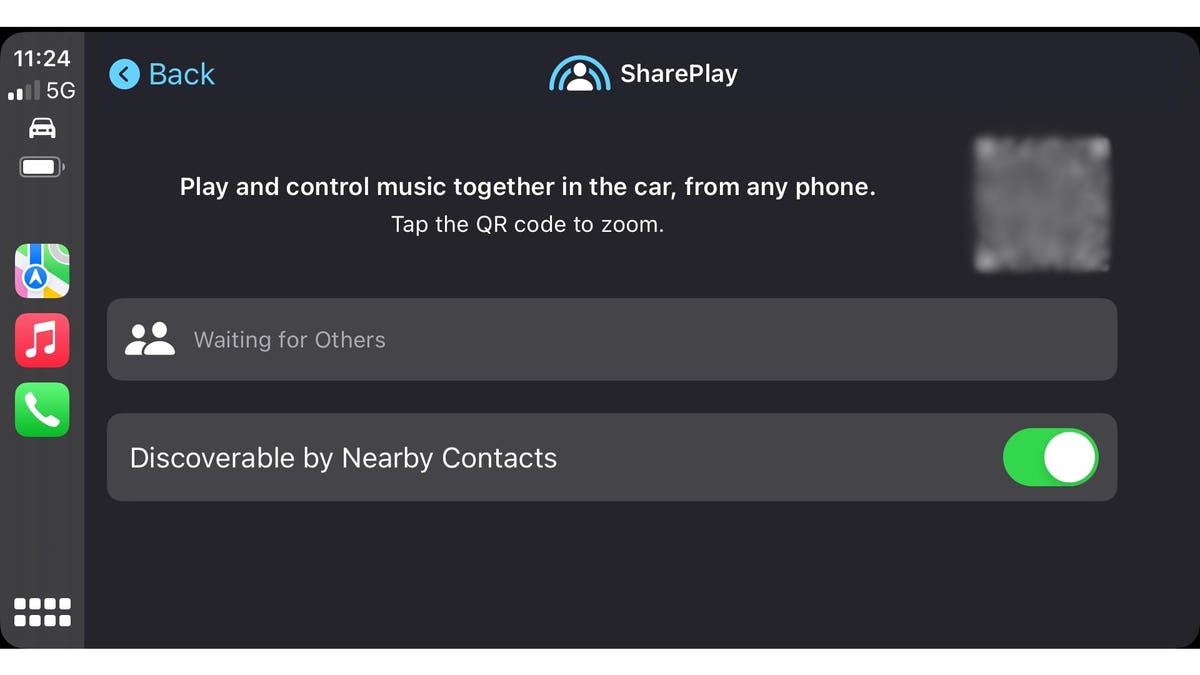
There’s a couple of ways that this works. If things are working the way they should (and everyone is on iOS 17) your passengers get a pop-up notification on their iPhone when you start the Music app on CarPlay. They’ll have the opportunity to “join the session.”
As with many “it just works” Apple features, it often doesn’t for a myriad of reasons. No worries, if they didn’t see the pop-up, dismissed it, or it just didn’t show up on their phone you can bring up a QR code for them to scan. From the Now Playing screen, click the SharePlay icon (it looks like a little person). They scan the code and ask to join the session.
In both cases, you’ll need to approve them as SharePlay participants (don’t do this while you’re actively driving). The nice thing is that, after you’ve done it once, they’ll be able to connect automatically to future SharePlay sessions until you revoke access (which, let’s be honest, you might need to do after the 22nd replay of Olivia Rodrigo’s latest album).
Passengers can even share SharePlay with other passengers via a QR code in the Music app by tapping the icon on the bottom of the screen.
What’s the catch?
In all instances, SharePlay participants are limited to the music that you can play or stream on your iPhone and the person initiating the SharePlay session must be an Apple Music subscriber. What’s great is that, once connected, all participants can play, pause, and add music to the queue. They don’t even have to be in the car with you.
It’s a better solution than passing around your phone or asking Siri to play a certain song. In my experience, that invites a different kind of chaos as you try to remember a song’s title and Siri decides to play something completely unrelated.
Not every SharePlay feature has been a hit (when was the last time you synced up your workout schedule remotely?) but this particular use has immediate utility and is a welcome addition to the CarPlay experience.
Read the full article here