




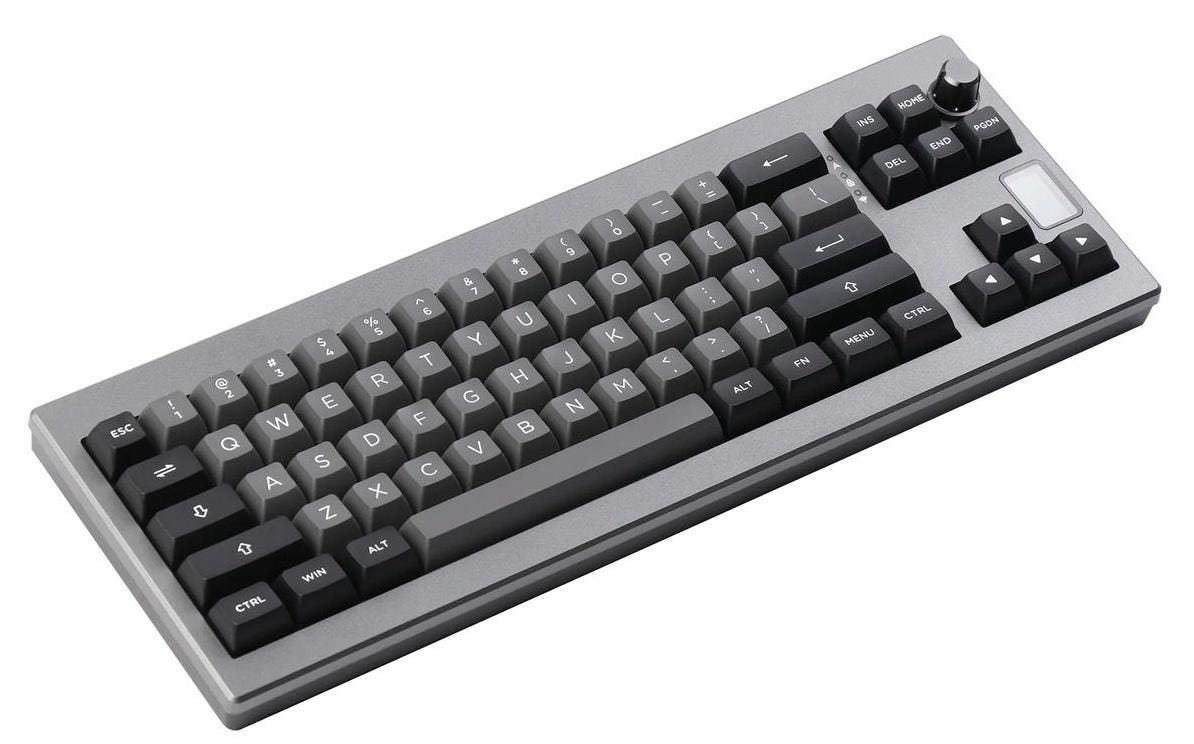
I love keyboards. This week, I had the chance to test the Shadow-X keyboard from EPOMAKER. This affordable mechanical wireless keyboard features an ANSI layout and a 70% design. It doesn’t have a separate row of Function or Media keys, but the numerals can work as Fn/Media keys when used in combination with the special Function key.
The unusual thing about the Shadow-X is its tiny OLED screen on the right-hand side, not much larger than a small postage stamp. The screen shows the date and time, the keyboard’s battery charge, plus the CAPS LOCK key status. The screen also indicates if the keyboard is in Mac or Windows mode alongside a few other things, such as the connection to the host computer.
The EPOMAKER Shadow-X keyboard can connect in one of three ways: USB-C cable, special RF wireless dongle or Bluetooth. The Bluetooth option can connect and switch between three different devices. A rotary switch is used to set the type of connection.
For the Shadow-X’s display to work correctly, you must first download the EPOMAKER software available for Mac or Windows. The software sets the correct time and date on the small display. Unfortunately, the instruction manual makes no mention of this, so that’s something that could definitely be improved.
The software needs a little more polish and could do with a few extra features, like an option to change the operating system and redefine some functions more efficiently. The EPOMAKER software automatically recognizes the operating system being used, but it switched to Windows mode at one point, forcing me to reset the keyboard to return to macOS. I later found out that there is a shortcut to do this, but the instruction manual did not mention it.
In addition to the EPOMAKER software for customizing the Shadow-X, the keyboard can have its firmware flashed so it’s QMK/VIA compatible. With this firmware onboard, it’s possible to use VIA software or a website to reconfigure and remap the Shadow-X’s keys. However, if you flash the firmware, you may find the keystrokes for setting the RGB LEDs no longer work and must be reprogrammed using VIA.
The switches on the Shadow X are all hot-swappable, and a keycap and switch puller are supplied in the box. You can specify the type of switch you want when you order the Shadow-X; there’s a choice of Flamingo, Gateron Yellow, Budgerigar, Bluebird or Wisteria types. Each one offers a different sound, travel length and feel, so you can choose the one that suits you best.
All the switches on the keyboard have south-facing RGB LEDs that can display various colors, animation effects and brightness. The direction of the LEDs ensures the lights shine towards the user. The LEDs draw their power from the keyboard’s 3,000mAh rechargeable battery.
With the LEDs turned on, the battery life is shortened, but that’s the trade-off you make for having all those pretty lights. Because the keycaps aren’t shine-through, I turned the LEDs off and got a longer battery life when using the keyboard wirelessly.
The keycaps on the Shadow X are made from hardwearing PBT material and are a double-shot construction. The legends are large and superbly sharp, making them ideal for anyone with impaired vision. Like most mechanical keyboards, the keycaps can be swapped out for a different design so long as they are compatible with Cherry MX fit.
The Shadow X is a gasket-mount keyboard with a layer of Poron and a silicone pad on the base that provides a smooth typing experience. The stabilizers and switches are all pre-lubed for extra smoothness. With the gasket structure design, the tactile feel and stability of the keys are solid, particularly on larger keys like the spacebar and Enter key. Long typing sessions are fun and not at all fatiguing.
Unfortunately, the Shadow-X doesn’t ship with any macOS modifier keys. I wish it did because this keyboard feels so good that some proper macOS modifier keys would make it perfect.
Verdict: This keyboard may have a few shortcomings with the software and instruction manual, but both can be easily improved. At first, I didn’t know if I would enjoy typing on the Shadow-X, but it has turned out to be one of the most satisfying mechanical keyboards I’ve reviewed in quite a while. The keycaps are well raked and there are two levels of flip-out feet to set the keyboard at the right typing angle. The Shadow-X has superb double-shot keycaps that make it incredibly satisfying to use. This is the perfect keyboard for touch typists and if you want a high-quality and compact mechanical keyboard with the “X Factor” and an excellent price, the EPOMAKER Shadow-X is the one for you. Highly Recommended.
Pricing & Availability: The EPOMAKER Shadow-X is available now from the EPOMAKER website and costs just $85.99.
More info: epomaker.com
Tech Specs:
- Model: EPOMAKER Shadow-X.
- Number of keys: 70 keys + 1 knob.
- Connectivity: Wireless 2.4GHz RF, Wired and Bluetooth.
- Battery: 3,000mAh.
- Structure: Gasket-mounted.
- LED direction: South-facing.
- Keycaps: Double shot PBT.
- Plate material: Polycarbonate.
- Hot-swappable switches: Yes.
- Bottom layer: Silicone pad.
- Sandwich layer: Poron foam, IXPE switch pad.
- Compatible systems: Win/macOS/Linux/Android/iOS.
- Dimensions: 370.4 x 129.8 x 47.8mm.
- Weight: 800g.
- Accessories: USB-C cable, 2.4GHz receiver, keycap/switch puller, extra keycaps.
Read the full article here