




Startup DreamersStartup Dreamers
  • Home
  • Startup
  • Money & Finance
  • Starting a Business
    • Branding
    • Business Ideas
    • Business Models
    • Business Plans
    • Fundraising
  • Growing a Business
  • More
    • Innovation
    • Leadership
Trending

How Shivon Zilis Operated as Elon Musk’s OpenAI Insider

May 4, 2026

Sam Altman’s Orb Company Promoted a Bruno Mars Partnership That Doesn’t Exist

May 2, 2026

US Senate Candidate Caught Insider Trading on Kalshi Says He Did It on Purpose

May 1, 2026
Facebook Twitter Instagram
  • Newsletter
  • Submit Articles
  • Privacy
  • Advertise
  • Contact
Facebook Twitter Instagram
Startup DreamersStartup Dreamers
  • Home
  • Startup
  • Money & Finance
  • Starting a Business
    • Branding
    • Business Ideas
    • Business Models
    • Business Plans
    • Fundraising
  • Growing a Business
  • More
    • Innovation
    • Leadership
Subscribe for Alerts
Startup DreamersStartup Dreamers
Home » This One Change Makes Slack Usable Again
Innovation

This One Change Makes Slack Usable Again

adminBy adminSeptember 21, 20232 ViewsNo Comments2 Mins Read
Facebook Twitter Pinterest LinkedIn Tumblr Email

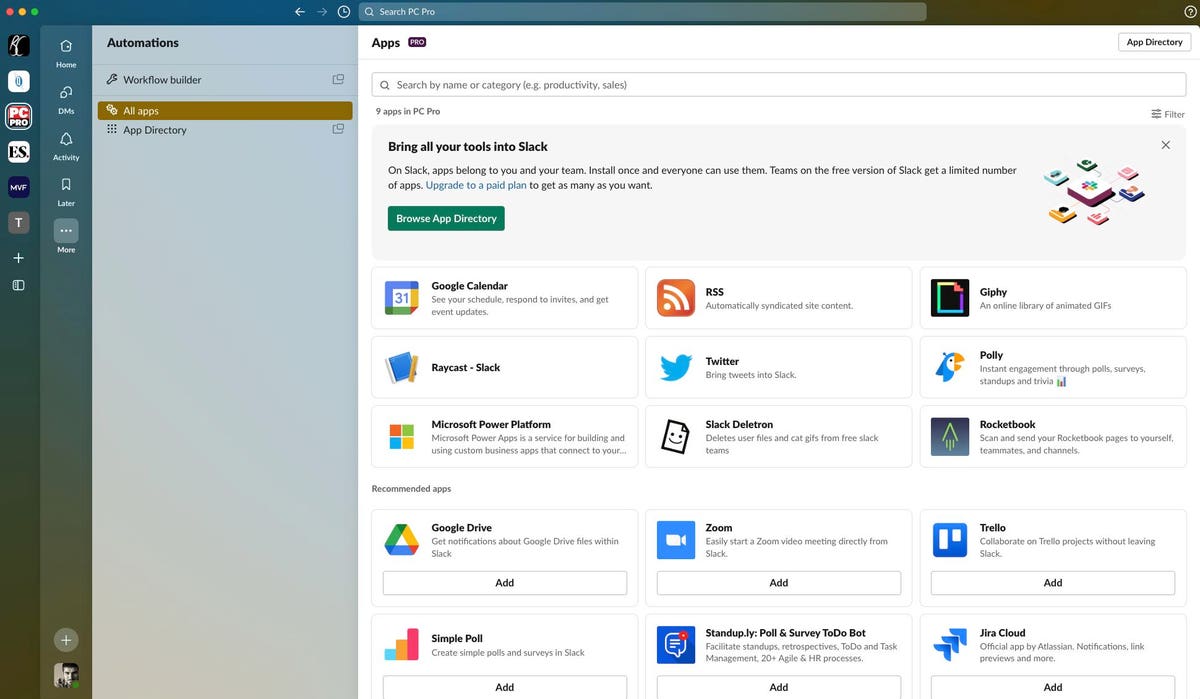
Slack is in the process of rolling out a new design, and it’s fair to say it’s not been met with universal approval. However, the company has backtracked on one of the most controversial aspects of its new look.

The new Slack interface has gone down particularly badly with customers who use the software with multiple clients. The redesign saw all of the user’s different workspaces hidden beneath a single icon, making it impossible to see alerts for individual workspaces.

If you have five different workspaces, but only care about alerts from your employer, say, the new design made it much more difficult to see notifications from that specific workplace.

The company has faced weeks of protest from customers regarding the change.

Finally, the company has backed down, allowing Slack users to once again see all of their workspaces.

How To See All Of Your Slack Workspaces

Assuming your workspace has been updated to the new interface, here’s how to make all of your workspaces visible again in the desktop client.

  1. Refresh Slack by pressing CTRL + R on Windows or Command + R on Mac.
  2. Hover the cursor over the icon for your workspace in the top-left corner of the screen, until a pop-up menu appears.
  3. Select “Show workspace switcher.”
  4. Your various workspaces should now appear in a pane on the left-hand side of the Slack interface, as it used to do with the old interface.

In a Twitter update announcing the new feature, the company admits this was a “pain point” for customers who had been upgraded to the new interface.

The company had previously resisted requests from customers to let them revert to the old interface. A support document on the company’s website stated: “It’s not possible to revert to the previous version of Slack.”

While the climbdown on the workspace switcher doesn’t address all of the problems with the new interface, not least that it breaks some legacy themes, it does indeed remedy one of the biggest drawbacks.

Read the full article here

Share. Facebook Twitter Pinterest LinkedIn Tumblr Email

Related Articles

What Are Peptides And Why Is Everyone Talking About Them?

Innovation April 29, 2026

Quantum Art’s Series A Is Now $140 Million

Innovation April 28, 2026

Magnets Are A Critical National Demand. Developing Rare Earths Is Key.

Innovation April 27, 2026

Chrisean Rock Vs. Zenith Zion Results, Highlights And Reaction

Innovation April 26, 2026

Today’s Wordle #1771 Hints And Answer For Saturday, April 25

Innovation April 25, 2026

This New Approach To Wildlife Revenue Could Be Plus For Conservation

Innovation April 24, 2026
Add A Comment

Leave A Reply Cancel Reply

Editors Picks

How Shivon Zilis Operated as Elon Musk’s OpenAI Insider

May 4, 2026

Sam Altman’s Orb Company Promoted a Bruno Mars Partnership That Doesn’t Exist

May 2, 2026

US Senate Candidate Caught Insider Trading on Kalshi Says He Did It on Purpose

May 1, 2026

Meta Is Sued Over Scam Ads on Facebook and Instagram

April 30, 2026

Join Our Livestream: Musk v. Altman and the Future of OpenAI

April 29, 2026

Latest Posts

AI Tools Are Helping Mediocre North Korean Hackers Steal Millions

April 28, 2026

Quantum Art’s Series A Is Now $140 Million

April 28, 2026

The Online Fiction Boom Reimagining China’s History

April 27, 2026

Magnets Are A Critical National Demand. Developing Rare Earths Is Key.

April 27, 2026

At ‘AI Coachella,’ Stanford Students Line Up to Learn From Silicon Valley Royalty

April 26, 2026
Advertisement
Demo

Startup Dreamers is your one-stop website for the latest news and updates about how to start a business, follow us now to get the news that matters to you.

Facebook Twitter Instagram Pinterest YouTube
Sections
  • Growing a Business
  • Innovation
  • Leadership
  • Money & Finance
  • Starting a Business
Trending Topics
  • Branding
  • Business Ideas
  • Business Models
  • Business Plans
  • Fundraising

Subscribe to Updates

Get the latest business and startup news and updates directly to your inbox.

© 2026 Startup Dreamers. All Rights Reserved.
  • Privacy Policy
  • Terms of use
  • Press Release
  • Advertise
  • Contact

Type above and press Enter to search. Press Esc to cancel.

GET $5000 NO CREDIT