




Startup DreamersStartup Dreamers
  • Home
  • Startup
  • Money & Finance
  • Starting a Business
    • Branding
    • Business Ideas
    • Business Models
    • Business Plans
    • Fundraising
  • Growing a Business
  • More
    • Innovation
    • Leadership
Trending

WhatsApp Adds Meta AI Chats That Are Built to Be Fully Private

May 24, 2026

What Is ‘Dusking?’ Namibia Named Best Place To Watch Day Turn To Night

May 24, 2026

Mira Murati Wants Her AI to ‘Keep Humans in the Loop’

May 23, 2026
Facebook Twitter Instagram
  • Newsletter
  • Submit Articles
  • Privacy
  • Advertise
  • Contact
Facebook Twitter Instagram
Startup DreamersStartup Dreamers
  • Home
  • Startup
  • Money & Finance
  • Starting a Business
    • Branding
    • Business Ideas
    • Business Models
    • Business Plans
    • Fundraising
  • Growing a Business
  • More
    • Innovation
    • Leadership
Subscribe for Alerts
Startup DreamersStartup Dreamers
Home » Everything You Need To Know
Innovation

Everything You Need To Know

adminBy adminSeptember 30, 20235 ViewsNo Comments2 Mins Read
Facebook Twitter Pinterest LinkedIn Tumblr Email

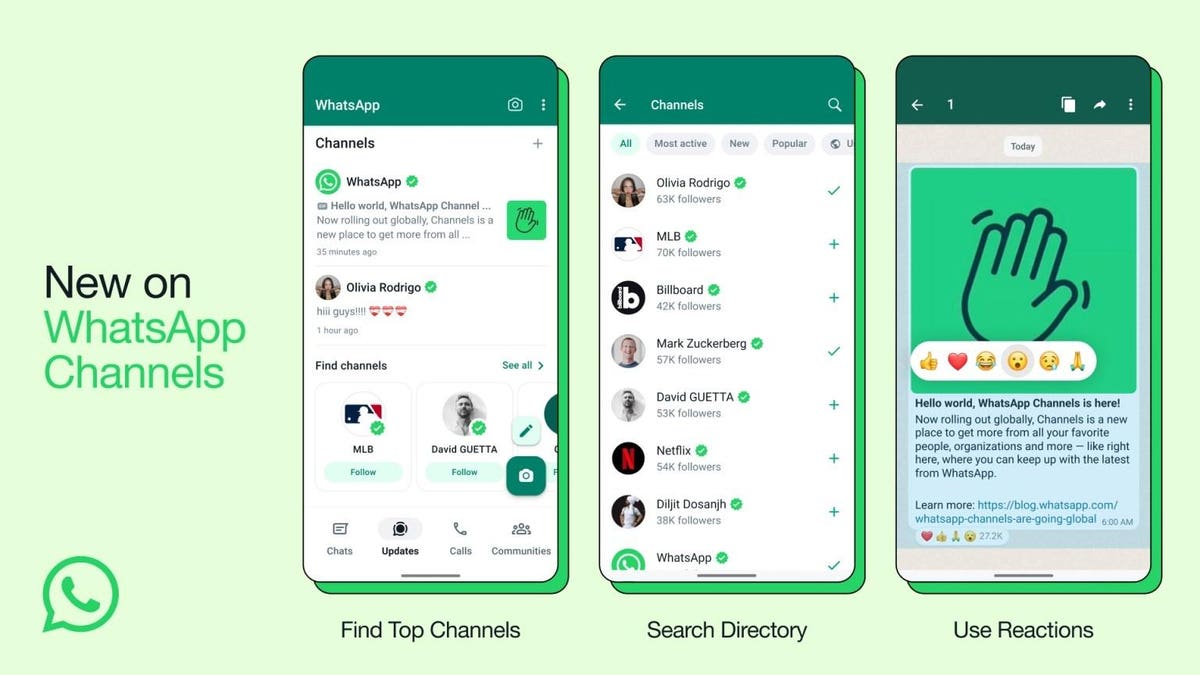
WhatsApp released a new feature called Channels a couple of weeks ago. It can be seen in the Status tab (which is now called “Updates”). In my opinion, the feature is a boring attempt at bringing one-way broadcasts from celebrities and influencers to your inbox. Here’s what you need to know about WhatsApp Channels.

What are WhatsApp Channels?

According to Meta, “WhatsApp Channels are a private way for people to receive updates that matter to them, right within WhatsApp.” Unlike WhatsApp groups, where you can interact with others, a WhatsApp Channel is a one-way broadcast feature where only the admin can send a message.

Meta has partnered with celebs across India to convert WhatsApp to yet another platform where people can “follow” them. But it’s not limited to them. You can create your own WhatsApp Channel too.

How to create a WhatsApp Channel

You can now build a following on WhatsApp without sharing your number. Here’s how to create a WhatsApp Channel

  • Open WhatsApp.
  • Tap on the Updates tab.
  • Tap on the + icon and go to Create Channel (iOS) / New Channel (Android).
  • Continue through the screen prompts.
  • You’ll get an option to customize your Channel where you can add a description and icon.
  • Tap on Create Channel.

Whatever you post on your Channel will be visible to all the followers. Moreover, up to 30 days of history will also be visible to people who don’t follow you. You can share written updates with formatting, images and videos on your Channel.

How to find Channels to follow on WhatsApp

You can find WhatsApp channels that interest you by browsing the Channel List, which is automatically filtered based on your country code and language preference. Here’s how you can find more Channels:

  • Open WhatsApp.
  • Go to the Updates tab.
  • Tap on the + icon > Find Channel. But the Find Channel option is also visible at the bottom of the Updates tab.
  • Tap the Follow button.

It seems like not many people are fond of having their Updates tab (formerly Status) crowded. I mean, there’s a reason why people are searching “how to remove WhatsApp Channels.” If you are searching for it too, please note that you can’t hide them from the Updates tab. You can only delete a Channel you created.

Read the full article here

Share. Facebook Twitter Pinterest LinkedIn Tumblr Email

Related Articles

What Is ‘Dusking?’ Namibia Named Best Place To Watch Day Turn To Night

Innovation May 24, 2026

Senator Cassidy’s Loss Shows Political Risk of Public Health Leadership

Innovation May 23, 2026

The AI-In-Education Problem Isn’t Cheating. It’s Passivity.

Innovation May 22, 2026

Google I/O 2026 Turned Gemini Into An Agent Platform

Innovation May 21, 2026

Why AI Literacy Has Become A Boardroom And Investor Priority

Innovation May 20, 2026

Addictive AI Could Become The Next Big Business Risk

Innovation May 19, 2026
Add A Comment

Leave A Reply Cancel Reply

Editors Picks

WhatsApp Adds Meta AI Chats That Are Built to Be Fully Private

May 24, 2026

What Is ‘Dusking?’ Namibia Named Best Place To Watch Day Turn To Night

May 24, 2026

Mira Murati Wants Her AI to ‘Keep Humans in the Loop’

May 23, 2026

Senator Cassidy’s Loss Shows Political Risk of Public Health Leadership

May 23, 2026

The Chinese App That Puts Instagram to Shame

May 22, 2026

Latest Posts

The Real Losers of the Musk v. Altman Trial

May 21, 2026

Google I/O 2026 Turned Gemini Into An Agent Platform

May 21, 2026

Overworked AI Agents Turn Marxist, Researchers Find

May 20, 2026

Why AI Literacy Has Become A Boardroom And Investor Priority

May 20, 2026

Companies Keep Slashing Employees’ Benefits for the Worst Reasons

May 19, 2026
Advertisement
Demo

Startup Dreamers is your one-stop website for the latest news and updates about how to start a business, follow us now to get the news that matters to you.

Facebook Twitter Instagram Pinterest YouTube
Sections
  • Growing a Business
  • Innovation
  • Leadership
  • Money & Finance
  • Starting a Business
Trending Topics
  • Branding
  • Business Ideas
  • Business Models
  • Business Plans
  • Fundraising

Subscribe to Updates

Get the latest business and startup news and updates directly to your inbox.

© 2026 Startup Dreamers. All Rights Reserved.
  • Privacy Policy
  • Terms of use
  • Press Release
  • Advertise
  • Contact

Type above and press Enter to search. Press Esc to cancel.

GET $5000 NO CREDIT