




Xencelabs is a relatively new name to the graphics tablet market, but it’s made a big impression with its Pen Tablet Medium Bundle, which I reviewed in July. Graphics tablets offer new precision when using Photoshop, drawing programs and other creative software. A graphics tablet with a pen is more precise than using a mouse or trackpad to edit photos or draw images.
A step up from a graphics tablet is a pen display. It’s like a graphics tablet but with a computer display built in so you can draw over it, much like an iPad or Android tablet running Photoshop or similar. A pen display takes the precision much further and is ideal for tracing, painting or creating complex shapes.
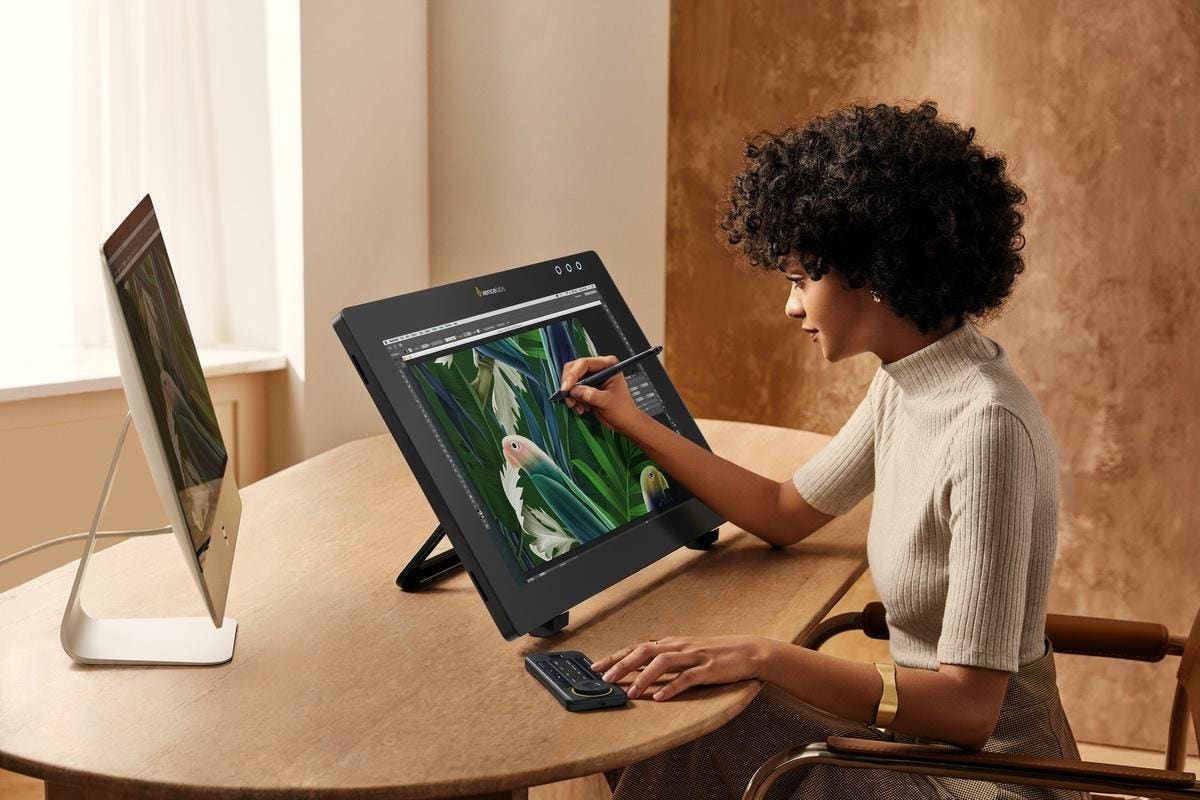
Xencelabs has recently launched its Pen Display 24 Studio Series. The new product is the latest addition to Xencelab’s range of digital design tools, including its Pen Tablet Medium, Pen Tablet Small and Quick Keys customizable remote.
The Xencelabs Pen Display 24 is supplied with the accessories needed and drivers are available to download for macOS, Windows or Linux. The Linux driver works like the Windows and Mac drivers and has the same full functionality.
The display is covered by edge-to-edge tempered glass coated with Xencelabs’ Super-AG Etching, which reduces glare and reflections, even in brightly lit rooms with overhead lighting. The oleophobic coating reduces the chance of fingerprints while providing just the right amount of friction for a natural feel when drawing.
Like the Xencelabs graphics tablet, the Pen Display 24 comes with pens in two sizes to suit different hands and drawing preferences. One of the pens has three buttons, while the other has two. Both pens also include an eraser. The three-button pen is especially suitable for 3D. Both pens can have their sensitivity adjusted with an initial activation triggered with pressure as low as 3g.
The Xencelab Pen Display 24 can display 1.07 billion colors on its 4K UHD display at resolutions up to 3,840 x 2,160. The display also supports six industry-standard color spaces. The Pen Display 24 is Pantone Validated, which can simulate the full range of Pantone Colors. It is also Pantone SkinTone Validated, which means the Pen Display 24 meets Pantone’s testing criteria and authentically reproduces the diverse set of skin tones found in the Pantone SkinTone Guide.
Also included with the Pen Display 24 is the Xencelabs Quick Keys panel. This handy device can be attached to the sides of the pen display and lets artists store their favorite shortcuts using an easy interface. The Quick Keys also has an OLED display to show the button assignments. The device can store up to 40 shortcuts per application. There’s also a physical dial with four function modes for zooming, rotating, changing brush size, plus other functions. Button settings change automatically whenever a new application is activated using the pen.
There’s quick access to settings via three programable LED buttons on the top of the Pen Display. The color of the buttons can be changed to serve as a reminder that the pen buttons or Quick Key button assignments may have changed when a different application is being used. A Virtual Tablet Mode enables pen control of multiple displays so objects can be dragged or manipulated from one display to another.
The tilt stand included with the pen display lets the screen be tilted to any angle between 16 and 72 degrees and it can be adjusted with one hand. There’s also a standard VESA mount (100 x 100mm) for mounting the display on a range of stands, such as an arm. An adjustable clip can hold the Quick Keys in place anywhere along the four sides of the display.
Pricing & Availability: The Xencelabs Pen Display 24 is available now and costs $1,899 / £1,850 / €2099.
More info: www.xencelabs.com
Tech Specs:
- Screen size: 23.8 inches (diagonal).
- Active area: 527.04 × 296.46mm.
- Resolution: 3,840 x 2,160 pixels.
- Uniformity compensation: Yes.
- Pixel pitch: 0.13725 × 0.13725mm.
- Touch: No.
- Brightness: 330cd/m2.
- Displayable colors: 1.07 billion (max).
- Color gamut coverage ratio: 99% Adobe RGB (CIE 1931), 93% DCI-P3 (CIE 1931) (min)
- Aspect ratio: 16:9.
- Viewing angle: 178° (89°/89°) H, (89°/89°) V.
- Display technology: ADS (a type of IPS).
- Contrast ratio: 1000:1.
- Pens: 3 Button Pen v2 + eraser, Thin Pen v2 + eraser.
- Pen technology: EMR, pressure-sensitive, cordless, battery-free.
- Pen pressure levels: 8,192.
- Pen tilt angle: 60 degrees.
- Pen resolution: 5,080 lpi.
- Weight: 6.0kg.
- Dimensions: 618.50 x 388.00 x 34.70mm.
- Tilt stand: Adjustable from 16 to 72 degrees.
- VESA: 100 x 100mm.
- Input voltage: 100 to 240V 50/60Hz.
- Power output: 12V / 5.0A.
- Pen switches: 3 side switches (3 Button pen), 2 side switches (Thin pen) plus eraser on both.
- Replacement nibs: 10 Nibs v2 (6 standard, 4 felt).
- Ports: 1 x USB C port (video and/or pen data), 1 x HDMI2.0, DisplayPort, 2 x accessory USB2.0 ports.
Read the full article here